Download CloudStream APK v4.8.0, the Free Streaming App for Android, Fire TV and PC
CloudStream is an open-source streaming app, free to use, that brings movies, TV shows, anime and live TV together in one player. You won’t pay a subscription, create an account or sit through ads. The latest version is CloudStream APK v4.8.0, and it runs on Android phones, Android TV, Fire TV Stick and PC. Install it, add one repository, and you’ll be watching in about five minutes.
Ready to install? Our download page has the latest stable and beta builds, straight from GitHub.
Tested on: Samsung Galaxy S25 Ultra on Android 16 · Fire TV Stick 4K Max · Windows 11 with BlueStacks 5
At a glance
What Is the CloudStream App?
The CloudStream app is a free media player for Android that streams and downloads video from sources you pick yourself. You’ll also see it called CloudStream 3 or CS3. Here’s the part that surprises most people: it arrives completely empty. You decide where your movies and shows come from by adding repositories and extensions.
Who Develops CloudStream?
The app is built by an open-source community, not a company. Its full code is public on CloudStream GitHub under the recloudstream account, licensed under the GPL-3.0 license, with more than 9,100 stars and 3,400 commits behind it. Every line is out in the open, so developers around the world review it, flag bugs and contribute improvements. That openness is a big reason it’s still free and ad-free.
How Does the App Work?
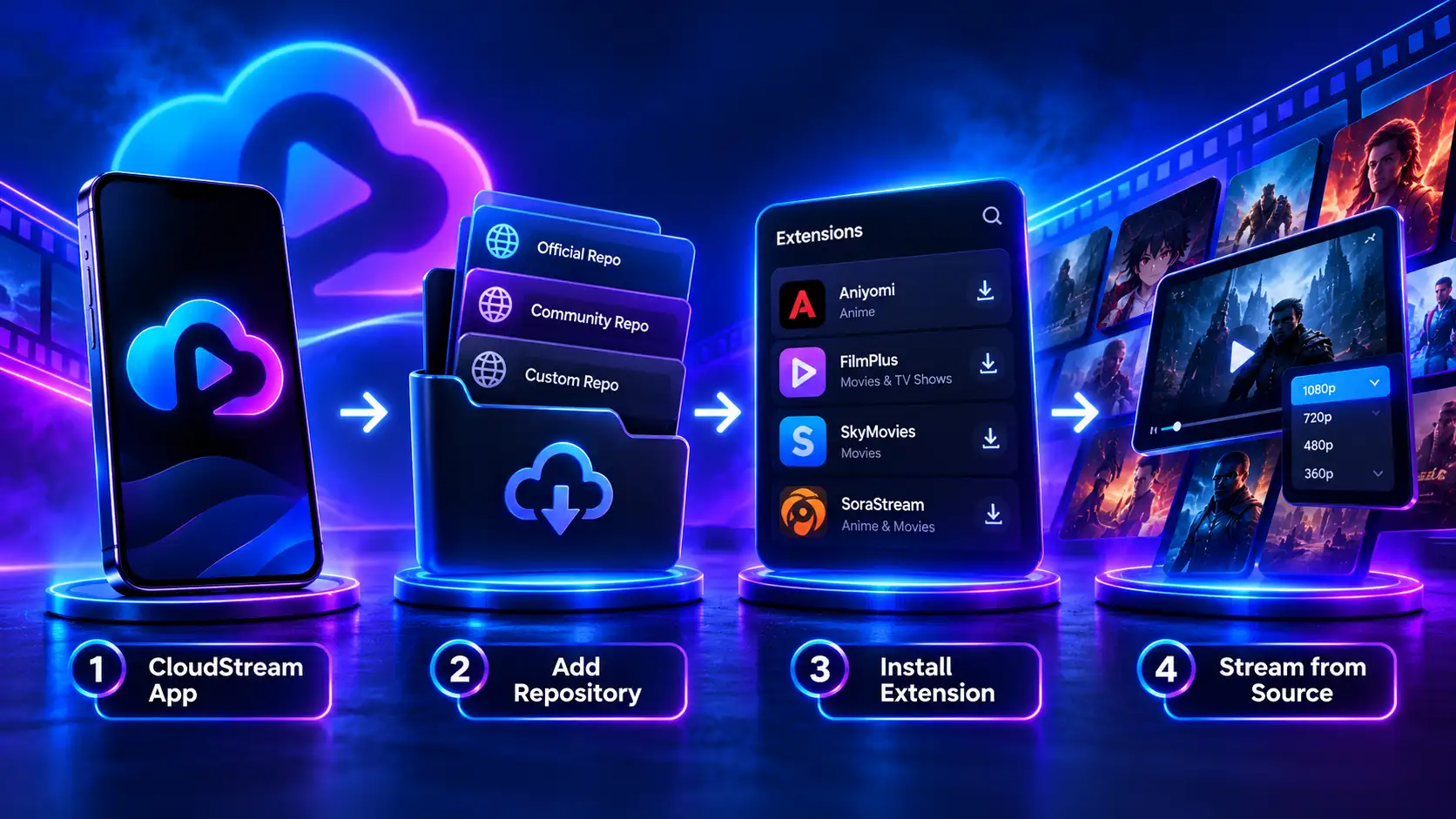
Picture a chain with four links. The app plays the video. A repository works like a menu of add-ons. Each extension fetches titles from a single website, and that website is where the video actually lives.
Why Does CloudStream Open With an Empty Screen?
Because you haven’t installed an extension yet. That’s completely normal on a fresh install, and nothing is broken. Go to Settings, then Extensions, then Add Repository, install one extension, and your home screen fills up. Still blank? Follow our blank screen fix.
Why Isn’t It on the Google Play Store?
Google doesn’t allow apps whose content depends on third-party sources the user adds, so the app can’t be listed there. Instead, you install the APK file directly. That’s called sideloading. It sounds technical, but it’s really just opening a file and tapping Install.
Key Terms Explained
| Term | What it means |
|---|---|
| APK | The file Android uses to package an app, a bit like an .exe on Windows |
| Sideloading | Putting an app on your device yourself, without going through Google Play |
| Repository (repo) | A catalog of add-ons, kept up by a community member, that you link to the app |
| Extension (plugin, provider) | The piece that fetches titles and video links from one website |
| Shortcode | A nickname for a repository, like MEGAREPO, so you don’t have to paste a long link |
| Pre-release (beta) | A test build released before the stable version |
| Emulator | Software like BlueStacks that runs Android apps on a Windows PC or Mac |
| Downloader code | A number you type into the Downloader app on Fire TV to fetch a file |
| DMCA takedown | A copyright request that can remove a repository link |
Who Is This App Actually For?
The app is a great fit if you want free streaming and don’t mind a quick, one-time setup. It isn’t for everyone, though, so here’s an honest look.
A good fit if you
Not the right fit if you
Content, features and devices
What Can You Watch on CloudStream?
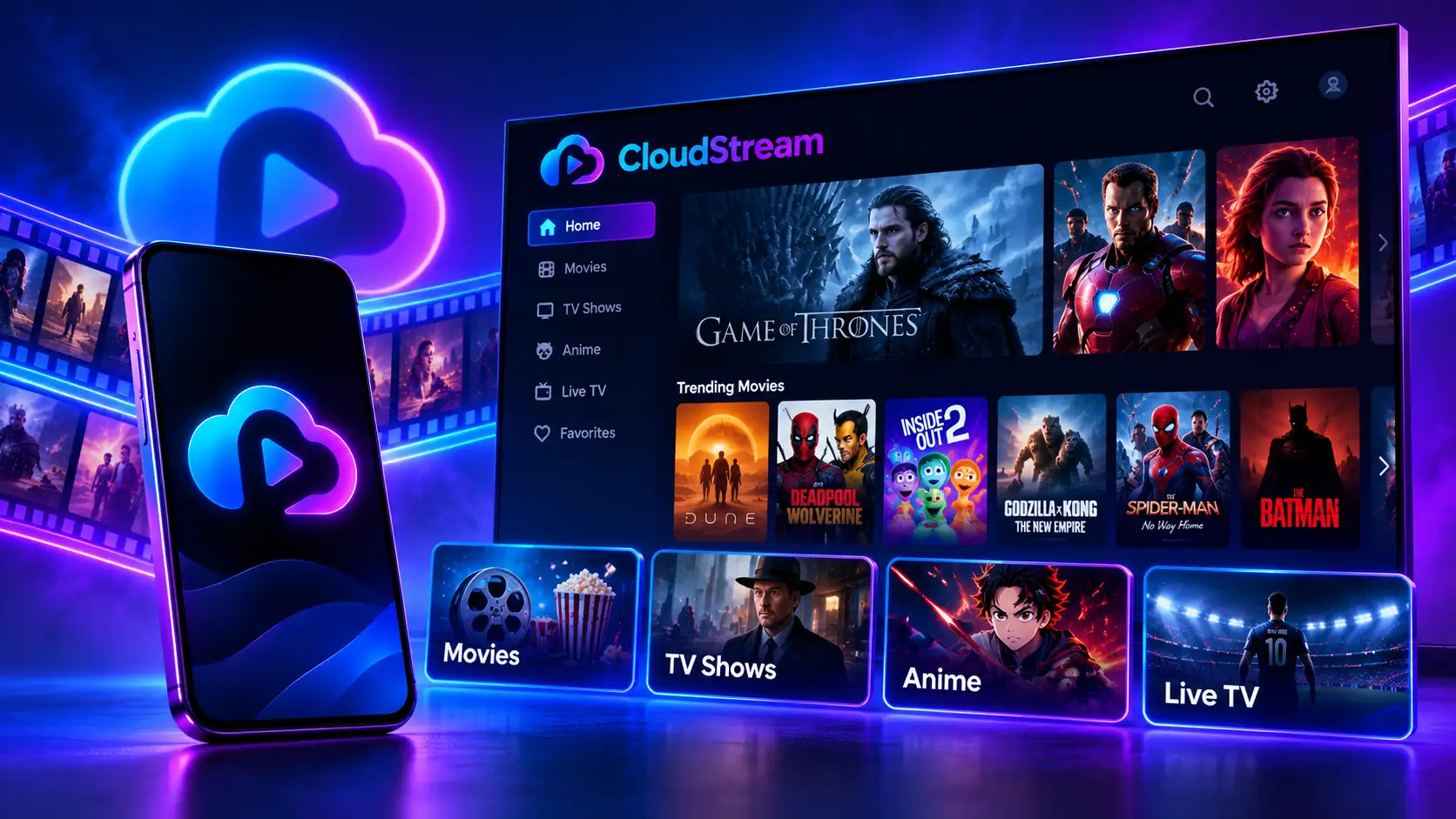
Pretty much anything: movies, TV shows, anime, live TV, YouTube and even audiobooks. What you actually see depends on the extensions you add.
Movies
Hollywood, Bollywood and world cinema in 720p, 1080p and 4K where the source offers it. If one link fails, another usually works.
TV Shows and Series
Full seasons of dramas, Korean series, Turkish series and sitcoms, tracked episode by episode.
Anime and Manga
Subbed and dubbed anime through extensions such as HiAnime, plus manga reading through MangaDex.
Live TV and IPTV
News, sports and regional channels through public playlists such as iptv-org.
YouTube, Twitch and Dailymotion
The official Providers repository adds all three, and the Invidious extension plays YouTube without ads or a Google sign-in.
Audiobooks
Free public-domain audiobooks through LibriVox.
Content in Your Language
Regional repositories cover Turkish, Arabic, Hindi, Indonesian, French and Spanish content, and OpenSubtitles adds subtitles in more than 130 languages. See the language sections in our repositories and extensions guide.
Features at a Glance
| Feature | What it does for you |
|---|---|
| No subscription or ads | You never pay, and nothing interrupts playback |
| No account needed | Nothing to sign up for or link to your identity |
| Offline downloads with a queue | Save several episodes and watch without internet |
| Up to 4K playback | Sharpness is limited only by your internet speed and the source |
| Skip intro (v4.8.0) | Jump past opening credits in one tap |
| TV layout with title overlay | Works with a remote on Android TV and Fire TV |
| Chromecast | Cast from your phone to a TV |
| Several links per title | Switch sources in seconds if one buffers |
| Adjustable subtitles | Size, width, timing and language, including ASS and SSA files |
| Watch history and lists | Resume where you stopped and sort shows into lists |
| Backup and restore | Save everything to one file before switching phones |
Sync Your Watch Lists
If you track shows on AniList, MyAnimeList or Simkl, link your account and every episode you finish gets marked as watched automatically. You can also sign in to OpenSubtitles for more subtitle downloads. All of this is optional; the app works perfectly without an account.
Which Devices Are Supported?
The app runs natively on Android devices, and you can use it on Windows, Mac and Linux through an Android emulator.
| Device | Works? | How to install | Guide |
|---|---|---|---|
| Android phone or tablet | Yes | APK file | This page |
| Android TV, Google TV | Yes | Downloader app | Android TV guide |
| Fire TV Stick, Fire TV Cube | Yes | Downloader app | Fire TV guide |
| Windows PC | Yes | BlueStacks emulator | PC guide |
| Chromebook | Yes | Android app support | APK file |
| Mac, Linux | Partly | Android emulator | PC guide |
| Samsung or LG smart TV | No | Cast from phone instead | Chromecast |
| iPhone, iPad | No | No official iOS app | — |
System Requirements
| Requirement | Minimum |
|---|---|
| Android version | 5.0 Lollipop or newer |
| Free storage | About 67 MB, plus space for downloads |
| RAM | 1 GB minimum, 2 GB recommended |
| Internet | Needed for streaming, not for downloaded videos |
| Permission | Give the app you downloaded with, such as Chrome, permission to install apps |
You don’t need an account, an email address or a payment method.
Install and verify
How to Install CloudStream on Android (Phone and Tablet)
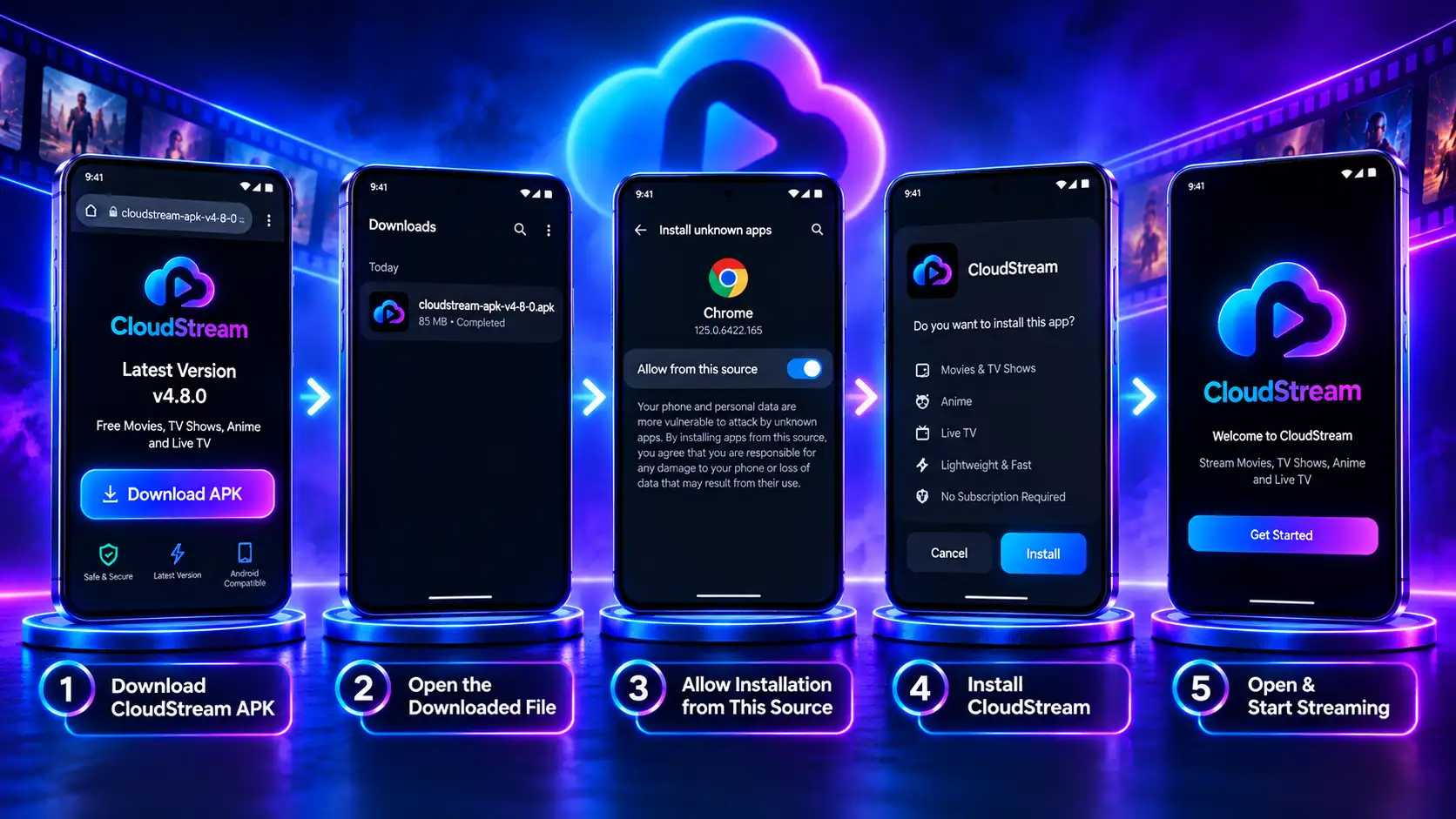
Installing CloudStream on Android takes about two minutes, and setting it up takes about five more. The app isn’t on Google Play, so you install the APK file yourself. It sounds technical, but it’s really just downloading a file and tapping Install. Every step below was tested on Samsung Galaxy S25 Ultra on Android 16, and the same steps work on Android tablets and on Chromebooks that run Android apps.
Before you start
| Item | Detail |
|---|---|
| Android version | 5.0 (Lollipop) or newer |
| Free space | About 67 MB, plus room for downloads |
| Time | About 2 minutes to install, 5 minutes to set up |
| Account needed | None, no Google sign-in or email |
Step 1: Download and Install the APK
Download the APK.
Tap the download button at the top of this page, or open our download page for stable and beta builds. The file saves to your Downloads folder.
Open the file.
Pull down the notification shade and tap the finished download, or open your Files app and look in Downloads.
Allow the install.
Android says it can’t install apps from this source yet. Tap Settings, turn on Allow from this source, then tap back.
Tap Install.
If Google Play Protect shows a warning, tap More details, then Install anyway. We explain why that warning appears further down.
Tap Open.
Pick your language and the Phone layout (or Tablet on a bigger screen).
Where to Find “Install Unknown Apps” on Your Phone
If you tapped past the permission prompt, you can turn it on by hand. You only allow it for the app you downloaded with, such as Chrome, not for your whole phone.
| Phone brand | Where to find it |
|---|---|
| Google Pixel and most Android 10+ phones | Settings → Apps → Special app access → Install unknown apps → Chrome → Allow |
| Samsung (One UI) | Settings → Apps → ⋮ menu → Special access → Install unknown apps → Chrome → Allow |
| Xiaomi, Redmi, POCO | Settings → Privacy protection → Special permissions → Install unknown apps |
| OnePlus, Oppo, Realme | Settings → Apps → Special app access → Install unknown apps |
| Android 7 and older | Settings → Security → Unknown sources (one switch for the whole phone) |
Can’t find it? Type unknown apps into the search bar at the top of Settings. Once the app is installed, you can switch the permission off again and only turn it back on for updates.
Step 2: Set Up CloudStream on Android in 5 Minutes
The app opens with an empty home screen. That’s normal: it doesn’t come with any content until you add a source. Do these in order:
Add your first repository.
Open Settings → Extensions → Add Repository and type a shortcode such as megarepo. Our repositories and extensions list has 40+ tested options, sorted by language.
Install two or three extensions.
Open the repository you added and tap the download arrow beside a few of them. More isn’t better; each one slows down search a little.
Pick a provider.
Go back to Home, tap the selector in the lower-right corner (it says “None” at first) and choose one of your extensions. Movies and shows appear.
Turn on auto-updates.
In Settings → Updates and Backup, switch on automatic extension updates so broken sources fix themselves.
Make a backup.
In the same menu, tap Backup. If you ever change phones, your whole setup comes back in seconds.
Using CloudStream on Android Day to Day
Once it’s set up, these are the things you’ll do most:
Android 14 and 15: The Extra “Older Version” Screen
On the newest phones, Android may say the app was built for an older version of Android after you tap Install. It’s a standard notice for apps installed outside the Play Store, not a sign that anything is wrong. Tap Install anyway, and CloudStream on Android 14 or 15 runs exactly as it does on older phones.
“App Not Installed” or Parse Error?
Three things usually cause it: the download didn’t finish, your phone runs something older than Android 5.0, or a copy signed with a different key is already installed. Delete the file and download a fresh copy, check your Android version, and if an old copy is installed, back it up and remove it first. Our errors and fixes hub covers every other install problem.
Watching on a TV or Computer Instead?
The app runs on bigger screens too; only the way you get the file there changes.
| Device | How it’s installed | Full guide |
|---|---|---|
| Fire TV Stick | Downloader app (Fire OS models only) | Fire TV guide |
| Android TV, Google TV | Downloader app or USB drive | Android TV guide |
| Windows, Mac, Linux | BlueStacks, BlueStacks Air or Waydroid | PC guide |
Want every device side by side? Our install guides hub compares them all.
How to Verify You Have the Official CloudStream APK
The official APK only comes from the CloudStream GitHub releases page, and our download button links to that exact build.
| Check | Value |
|---|---|
| Official source | The project’s GitHub releases page |
Want to double-check? Open the APK in any free hash-checker app and compare its SHA-256 value with the one above. If they match, the file hasn’t been touched.
Why Does Google Play Protect Warn About This App?
Don’t panic, it’s normal. Google shows this screen whenever an app comes from anywhere other than its own store, whether that’s this app or a beta from your bank. It’s a “we haven’t checked this” notice, not a malware alert. If your file came from the official cloud stream GitHub release and the checksum matches, go ahead and tap “Install anyway”.

How to Spot a Fake or Modded APK
Every feature in the app is already unlocked for free, so a “mod” version has no real reason to exist, except to slip something else onto your phone. If a download promises premium extras, wants access to your SMS or contacts, or comes from a site that won’t name its source, walk away.
Are cloudstream.com and cloudstream.cf Official?
No. The app’s only official home is its GitHub page. Domains like these aren’t run by the developers, and the old .cf repository address no longer works.
Versions and updates
What’s New in CloudStream v4.8.0?
v4.8.0 brings a skip-intro button, a title overlay on TV and support for more external players, plus security and download fixes. These notes come straight from the official GitHub release.
| Type | Change |
|---|---|
| New | Skip intro database: jump past opening credits on many shows in one tap |
| New | Metadata overlay on TV: title details on screen during playback on Android TV and Fire TV |
| New | More external players, such as VLC and MX Player |
| Fixed | Several security issues |
| Fixed | Downloads that stalled or failed in earlier versions |
| Updated | Anime filler database and small UI improvements |
Also Included From v4.7.0
If you’re coming from an older version, v4.8.0 also includes everything from v4.7.0: one-tap repository install, automatic extension updates, 12 extra providers, a download queue, torrent streaming, steadier 4K casting, better ASS and SSA subtitle timing, adjustable subtitle width, swipe gestures for volume and brightness, zoom control and title logo artwork.
Is There a CloudStream Beta?
Yes. The developers push pre-release beta builds to GitHub before every stable update. You get new features first, but betas can crash or break extensions, so keep the stable version on your main device and try betas on a spare one.
Version History
| Version | Released | Main changes |
|---|---|---|
| v4.8.0 | July 2026 | Skip intro, TV overlay, more external players, security fixes |
| v4.7.0 | March 2026 | One-tap repos, download queue, torrent streaming, 12 providers |
| v4.6.x | 2025 | Stability fixes and extension updates |
Older builds stay on the GitHub releases page if you ever need to roll back.
How to Update Without Losing Your Data
Updating is simply a matter of installing the new version over the old one. Android swaps the app out and leaves your saved data alone, so your repositories, extensions and progress carry over.
Don’t uninstall the old version first.
Removing the app first throws away everything you’ve set up, from your repository list to where you left off in each show. Plenty of older guides still recommend it, but it only creates extra work.
Back up your setup (optional).
Open Settings, then Updates and Backup, and tap Backup.
Download the latest version.
Get v4.8.0 from our download page.
Install over the top.
Open the file and tap Update.
Check your extensions.
Most reconnect on their own. If any are missing, open Settings, then Extensions, and tap refresh.
How to Update Extensions Only
Open Settings, then Updates and Backup, and tap Update Extensions. You can also turn on automatic extension updates there. If an extension refuses to update, see extensions not updating.
What If an Update Breaks Something?
Clear the cache in Settings first, then reinstall the extension that stopped working. If that doesn’t help, restore your backup with our backup and restore guide, or check our errors and fixes for your exact error.
Repositories
CloudStream Repositories and Extensions Explained
Every title you watch in the app arrives through two pieces working together: repositories and extensions.
What Is a Repository?
Think of a repository as a catalog that a community member keeps up to date. You link it once by URL or shortcode, and every add-on in that catalog becomes available to you.
What Is an Extension?
An extension is a small plug-in built for one specific website. It pulls that site’s movies, shows, anime or channels into your library, and you only get the ones you choose to install.
Why Does the App Use Repositories at All?
It comes down to how the app stays free, legal and working. The developers only build the player; they don’t host or choose any content. Community members write the extensions and share them through repositories. That setup has four real benefits:
It’s the same idea as add-ons in Kodi or Stremio. It takes a minute to set up, but it’s far more flexible and lasts much longer than an app with fixed sources.
Popular Repositories We Tested
| Repository | Shortcode | Best for | Status | Last tested |
|---|---|---|---|---|
| Official Providers | CSPR | YouTube, Twitch, Dailymotion | Working | Oct 28, 2026 |
| Mega Repository | MEGAREPO | Movies and TV shows | Working | Oct 28, 2026 |
| Avocado / Rowdy’s | ROWDYCADO | Anime, MyFlixer, MangaDex, 4K sources | Working | Oct 28, 2026 |
| CSX | CSX | Hindi and English films | Working | Oct 28, 2026 |
| Hexated | Link | Mixed sources | Working | Oct 28, 2026 |
| Multilingual | Link | Arabic, French, Indonesian, Spanish | Working | Oct 28, 2026 |
See the full, regularly tested list in our repositories and extensions guide.
Two Ways to Add a Repository
Shortcode or URL:
Settings → Extensions → Add Repository, then paste the shortcode or link.
One-tap install (Android):
Tap Direct Install next to a repository on our list. The app opens and asks you to confirm.
Why Do Repository Links Stop Working?
Usually because of DMCA copyright takedowns. When that happens, the maintainer moves to a new link and the old one stops working. So if a repository suddenly goes empty, don’t reinstall the app; just grab the current link. Our No Links Found guide shows exactly what to do.
Tips and fixes
Tips for Smoother Streaming
A few small habits fix most playback problems before they even start.
Add More Than One Repository
MEGAREPO covers general movies and shows, ROWDYCADO has strong anime and 4K extensions, and CSX covers Hindi and English films. With several sources, a dead link on one usually has a working copy on another.
Switch Sources When a Video Buffers
Tap the screen during playback and choose Sources. You’ll see every link for that title with quality labels.
Clear the Cache Every Few Weeks
Open Settings and clear the cache to keep the app quick, especially on older phones and Fire TV Sticks.
Use a VPN Only When a Source Is Blocked
Most content plays without one. If a source is blocked in your country, our VPN guide explains when a VPN helps.
Fix Subtitle Sync in Seconds
Adjust subtitle timing from the player, or pick another file from OpenSubtitles. For harder cases, see subtitles not working.
Turn On Episode Alerts
Following a show that’s still airing? Hit the bell on its page and the app lets you know the moment a new episode lands.
Best Settings for Phones, TVs and Low-End Devices
| Setting | Phone | Android TV / Fire TV | 2 GB RAM device |
|---|---|---|---|
| Layout | Phone | TV | Phone or TV |
| Default quality | Auto | 1080p or 4K | 720p |
| Player buffer | Default | Larger | Smaller |
| Downloads location | Internal or SD card | Internal | SD card |
| Auto-update extensions | On | On | On |
Our settings guide explains every option.
How Much Data Does It Use?
About the same as any other streaming app. It really comes down to the quality you pick. Here are typical numbers per hour:
| Quality | Data per hour (approx.) |
|---|---|
| 480p | 0.5–0.7 GB |
| 720p | 1–1.5 GB |
| 1080p | 2.5–3 GB |
| 4K | 7 GB or more |
On a limited plan, download episodes on Wi-Fi and watch them offline.
Common Problems and Quick Fixes
Most problems take less than a minute to fix. Here are the common ones, and our errors and fixes hub has a full step-by-step guide for each.
| Problem | Likely cause | Quick fix | Full guide |
|---|---|---|---|
| Empty home screen | No extension installed | Add a repository and install an extension | Blank screen fix |
| No links found | Source down or link removed | Switch extension or update the repository | No Links Found |
| Extensions won’t update | Old repository URL | Remove and re-add the repository | Extension update |
| Subtitles missing or out of sync | Wrong file or timing | Pick another subtitle or adjust timing | Subtitles fix |
| Backup won’t restore | Version mismatch or file moved | Update the app, then restore again | Backup and restore |
| Video keeps buffering | Slow source or connection | Switch source or lower quality | Settings guide |
| Source blocked in your country | Regional restriction | Try another source or a VPN | VPN guide |
| App not installed / parse error | Bad download or old Android | Download again; check Android 5.0+ | All errors |
Compare and trust
CloudStream vs Other Free Streaming Apps
If you want a free, open-source app with downloads and full control over your sources, the app is hard to beat. Here’s how it stacks up.
| App | Setup | Open source | Offline downloads | Best for |
|---|---|---|---|---|
| CloudStream | About 5 minutes | Yes (GPL-3.0) | Yes, with a queue | Control over sources, anime, TV and phone |
| Kodi | Long and technical | Yes | Limited | Power users who enjoy custom builds |
| Stremio | Quick | Partly | No | A polished catalog run through add-ons |
| BeeTV | Instant | No | Yes | Quick movie links with no setup |
| Nova TV | Instant | No | No | Simple casual viewing |
| TiviMate | Needs a playlist | No | No | Live TV with your own IPTV playlist |
How It Compares With Stremio
Stremio looks polished and sets up fast, but it has no offline downloads and is only partly open source. The app gives you downloads and more control.
How It Compares With Kodi
Kodi is more powerful but takes far longer to set up and maintain. The app works in minutes with a TV-friendly layout.
CloudStream APK Pros and Cons
Pros
Cons
Is CloudStream Safe and Legal?
Is It Safe?
Yes, as long as you install the official build. The code is public on GitHub, and the official APK scans clean on VirusTotal. The real risk is modified copies floating around on random sites, so always confirm the file’s origin and compare the checksum.
Is It Legal?
The software itself breaks no law. It’s an open-source player that stores no movies or shows of its own. What decides legality is the source behind each extension and the copyright rules in your country, so pick sources that hold the rights to what they offer.
Does It Collect Your Data?
Not really. You never create an account, and your watch history is saved on your phone rather than on someone’s server. If you turn on AniList or another sync service, only what you choose to sync is shared.
Is It Safe for Kids?
Not on its own. There are no built-in parental controls, and what shows up depends on the extensions installed. For kids, use device-level controls like Google Family Link or a kids’ profile on your TV.
This website is an independent guide. We are not affiliated with the app’s developers, and we don’t host any videos, repositories or extensions.
How We Test and Update This Guide
Every step on this page is tested on real devices before we publish it.
Questions or a broken link? Contact us.
Join the Community
The best places for help and news are the official GitHub repository (bug reports and releases), the official Discord server, Reddit communities, and the community-run wiki.
FAQ and close
CloudStream FAQ
What is CloudStream? It’s a free, open-source Android app for streaming and downloading movies, shows, anime and live TV from sources you add yourself.
Still stuck? Our errors and fixes hub covers every common problem.
Final Verdict: Is CloudStream Worth Downloading?
If you want free streaming without ads, accounts or subscriptions, yes. The app is open source, works on your phone, TV and PC, and takes about five minutes to set up. Grab the CloudStream APK v4.8.0 from our download page, add one repository, and you’re good to go.